
Free staff time tracking that actually adds up.
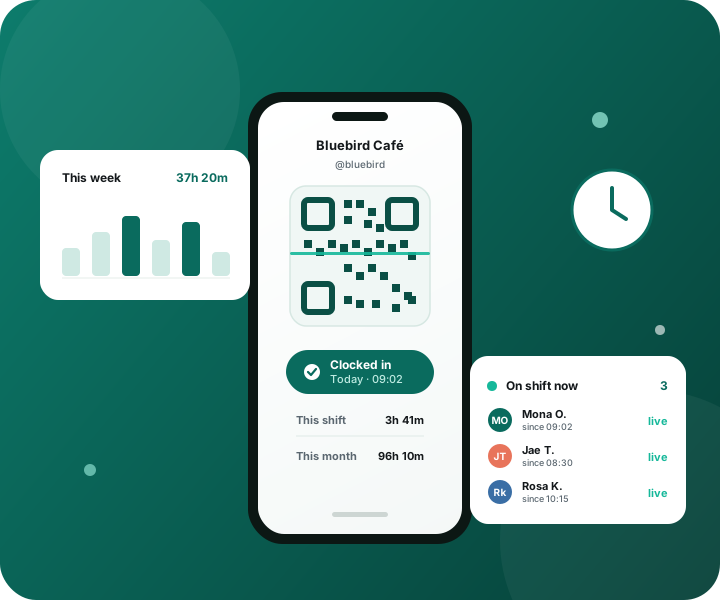
Stop guessing who was actually here. ShiftPeek is a free QR code time clock for shops and stores — staff scan to clock in and out, you see who's on shift live, and monthly hours total themselves. No paper timesheets, no punch cards.
Built for the way real shops run
A time clock app built for every kind of shift-based team.
Whatever you sell or serve, if your team clocks in and out, ShiftPeek turns that into a staff time tracking record you can trust — free, with no hardware to buy.
Retail stores & shops
A retail employee time clock for the shop floor. QR clock-in tracks every register and stockroom shift, so scheduled hours and worked hours finally match.
Cafés & restaurants
Café and restaurant staff scheduling lives and dies by who actually showed up. ShiftPeek's shift tracking software logs every barista and server clock-in the moment it happens.
Salons & spas
Salon and spa employee time tracking without a wall-mounted terminal. Stylists and therapists clock in from their own phone between clients, and hours total themselves.
Bakeries & kitchens
Early starts make a bakery shift log easy to get wrong on paper. A QR scan at the door captures the true clock-in time, even at 4am.
Bars & kiosks
Bar staff time tracking and kiosk employee hours, covered by the same rotating QR code — no shared PIN pad for a busy till to slow down.
Workshops & small crews
Workshop and small-crew time tracking for teams that move between jobs, not just a till. Every crew member's hours land in one place, per store.
Tracking a shift by hand is a slow, expensive guess.
A notebook by the till or a rack of punch cards feels simple — until payday, when nobody can prove who worked what.
“I’m sure I started at 9.”
Hand-written start and end times are an honour system. A few rounded-up minutes per person, per day, quietly becomes hours you’re paying for that nobody worked.
Punch cards lie too.
Stamp clocks get buddy-punched, jammed, or “forgotten.” Correcting one bad stamp means a pen, an initial, and a story you have to take on faith.
You can’t see “now.”
Who’s actually behind the counter this minute? With paper, you find out by walking over. There’s no way to glance and know who is on the clock right now.
Fixing a mistake is a chore.
Someone forgot to sign out, or wrote the wrong day. Editing it means re-copying a whole row, recalculating by hand, and hoping the totals still tie out.
Month-end is a calculator marathon.
At the end of the month it’s you, a pile of sheets, and a calculator — adding fifteen-minute fragments across thirty days for every single person. One slip and a paycheck is wrong.
Disputes have no referee.
When a staff member says they worked more and the sheet says less, whose handwriting wins? Without a trustworthy record, every disagreement is a coin-flip.
ShiftPeek replaces the notebook, the stamp clock, and the calculator with one record everyone can trust.
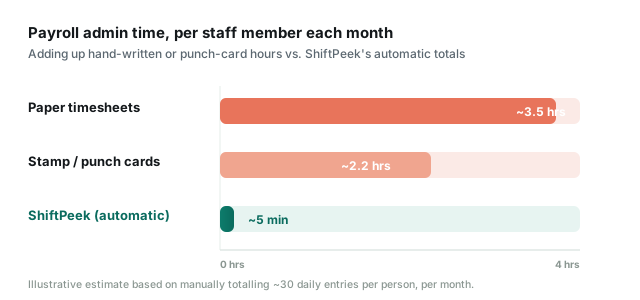
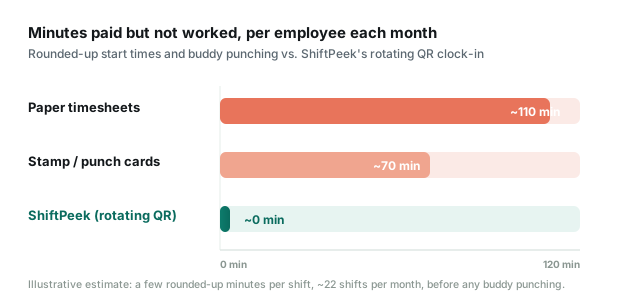
Paper timesheets vs. punch clocks vs. a QR time clock.
Three ways to track employee hours, side by side — what each one costs you, and what each one lets slip through.
| Paper timesheets | Punch clock | ShiftPeek | |
|---|---|---|---|
| Upfront cost | Notebooks & pens | $200–$500 terminal | Free — any spare phone or tablet works |
| Stops buddy punching | No — anyone can write a name | No — cards get swapped | Yes — rotating QR only works at the counter |
| See who's on shift now | Walk over and look | Walk over and look | Live, from anywhere |
| Fixing a wrong entry | Re-copy the row by hand | Pen, initials, and trust | Edit in seconds, totals recalculate |
| Monthly hour totals | Calculator marathon | Calculator marathon | Automatic, always current |
Hours you can trust, without the busywork.
Everything you need to record, watch, correct, and total your team’s time — and nothing you don’t.
QR clock-in you can trust
Staff scan a store code that changes every minute, so a punch can only happen at your counter — not from the bus, not from a friend’s phone.
See who’s on shift, live
A real-time view of everyone currently clocked in. Glance once and know exactly who’s working — from the back office or from home.
Edit a shift in seconds
Forgot to clock out? Wrong time? Open the shift, fix the minutes, done. Every total recalculates itself instantly — no eraser required.
Monthly totals, automatically
Every staff member’s hours add themselves up by the day and the month. When payday comes, the number is already waiting — calculator-free.
Every staff member, one place
Add your team, give each person a simple login, and keep all of their shifts and totals together — per store, neatly separated.
One honest record
No more “he-said, she-said.” Each clock-in is timestamped and tied to a person, so disputes settle themselves and payroll stays fair.
From clock-in to payday, without paper.
ShiftPeek follows a shift the whole way — captured at the counter, visible in real time, correctable in a tap, and totalled for you at month-end.
Up and running in three steps.
No hardware to buy, no installer to run. If your team has a phone, you’re ready.
Create your store
Sign up free and pick a short store handle. Add your staff and give each one a simple login — that’s the whole setup.
Staff scan to clock in
Put the store’s rotating QR code at the counter. To start or end a shift, staff scan it from their own phone. The code only works on the spot.
Watch & total automatically
See who’s on shift in real time, correct anything in a tap, and let monthly hours add themselves up — ready the moment you need them.
Free to use.
ShiftPeek is free to use, with no contract and no credit card required.
Get started
No card. No trial timer.
- Staff & shift tracking
- Rotating QR clock-in
- Live “on shift now” view
- One-tap shift edits
- Automatic monthly totals
Provided “as is”, with no warranties. See our Terms of Service.
Good to know.
Yes. Creating a store, adding staff, clocking shifts, and reading your monthly totals are all free to use. There’s no credit card and no trial countdown.
The code on display at your store changes every minute and is unique to that store. A scan only counts if it matches the current code, so staff have to be physically at the counter to start or end a shift.
Nothing new. Any phone or tablet you already have can be the clock — it displays the store’s rotating QR code, and your staff scan it with the phones they already carry. There’s nothing to install and nothing to wire up.
Two web links, nothing to install. Your team signs in on their own phones at shiftpeek.com/staff, and the device you keep at the counter opens shiftpeek.com/clock. Once you’re signed in, your store’s management page shows both links with a one-tap “copy”, so you can send the right one to your staff or save it on the till tablet.
You can open the shift and correct the times in seconds. The daily and monthly totals recalculate themselves the moment you save.
ShiftPeek is a free service provided strictly “as is.” We make no guarantees of availability, accuracy, or data retention, and we accept no liability for any loss. Keep your own records of anything important, and please read the Terms of Service before you rely on it.
Talk to us.
Questions, feedback, or need a hand getting set up? Send us a message and we’ll reply by email.
Give your hours a record everyone can trust.
Set up your first store in minutes and never chase a paper timesheet again.
No credit card required.